How to read email headers during a phishing investigation
A practical guide to tracing an email's delivery path, interpreting SPF, DKIM, DMARC, and filtering headers, and identifying the evidence that matters during phishing investigations.
A suspicious email rarely tells its full story in the inbox.
The display name may look familiar, the sender address may appear legitimate, and the message may use a real company logo. However, those visible elements do not explain which infrastructure delivered the email, which domain authenticated it, or where a reply will actually go.
But good news! That evidence can be found in the email headers.
Headers can help you identify sender mismatches, reconstruct the delivery path, evaluate authentication, and understand how the receiving mail platform processed the message. They are valuable evidence, but they are not a final verdict. A malicious email can pass SPF, DKIM, and DMARC, while a compromised account can produce headers that look completely normal.
Preserve the original message
Avoid forwarding the suspicious message normally. A forward creates new transport headers and may remove or alter parts of the original evidence.
Whenever possible, collect:
- The original message source or an
.emlfile. - The raw headers from the recipient's mailbox.
- The message directly from the mailbox platform, email security platform, or investigation tools.
- The recipient, collection time, subject, and message identifier.
Header fields
| Header | What it tells you |
|---|---|
From | The identity shown to the recipient |
Reply-To | Where replies will be sent |
Return-Path | The SMTP envelope sender used for delivery errors |
Received | The servers that handled the message |
Authentication-Results | SPF, DKIM, DMARC, and other authentication results |
DKIM-Signature | The domain and selector used to sign the message |
Message-ID | An identifier normally created by the sending system |
A good thing to notice is not whether one field looks suspicious. It is whether all fields tell a consistent story.
A sample header
The following example is synthetic:
From: "Acme Security" <support@acme-example.com>
Reply-To: Acme Security Desk <securitydesk@account-helpdesk.example>
To: alex@contoso-example.com
Subject: Password expiration notice
Message-ID: <20260713091103.48291@smtp.mailer-example.net>
Return-Path: <bounce@smtp.mailer-example.net>

Received: from smtp.mailer-example.net (203.0.113.45)
  by inbound-gateway.recipient-example.com
  with ESMTP; Mon, 13 Jul 2026 09:11:05 +0000

Authentication-Results:
  spf=pass smtp.mailfrom=smtp.mailer-example.net;
  dkim=pass header.d=mailer-example.net;
  dmarc=fail header.from=acme-example.com

DKIM-Signature: v=1; a=rsa-sha256; d=mailer-example.net;
  s=mail2026; h=from:to:subject:date:message-id;

X-Filtering-Report:
  Source-IP:203.0.113.45; Country:US; Spam-Score:5; Category:PHISHING;
  HELO:smtp.mailer-example.net; PTR:smtp.mailer-example.net;
The message appears to come from acme-example.com, but replies are sent to account-helpdesk.example.
The return path and DKIM signature use mailer-example.net.
SPF and DKIM passed, but they passed for mailer-example.net, not for Acme.
DMARC failed because neither authenticated domain aligned with the domain shown in the visible From field.
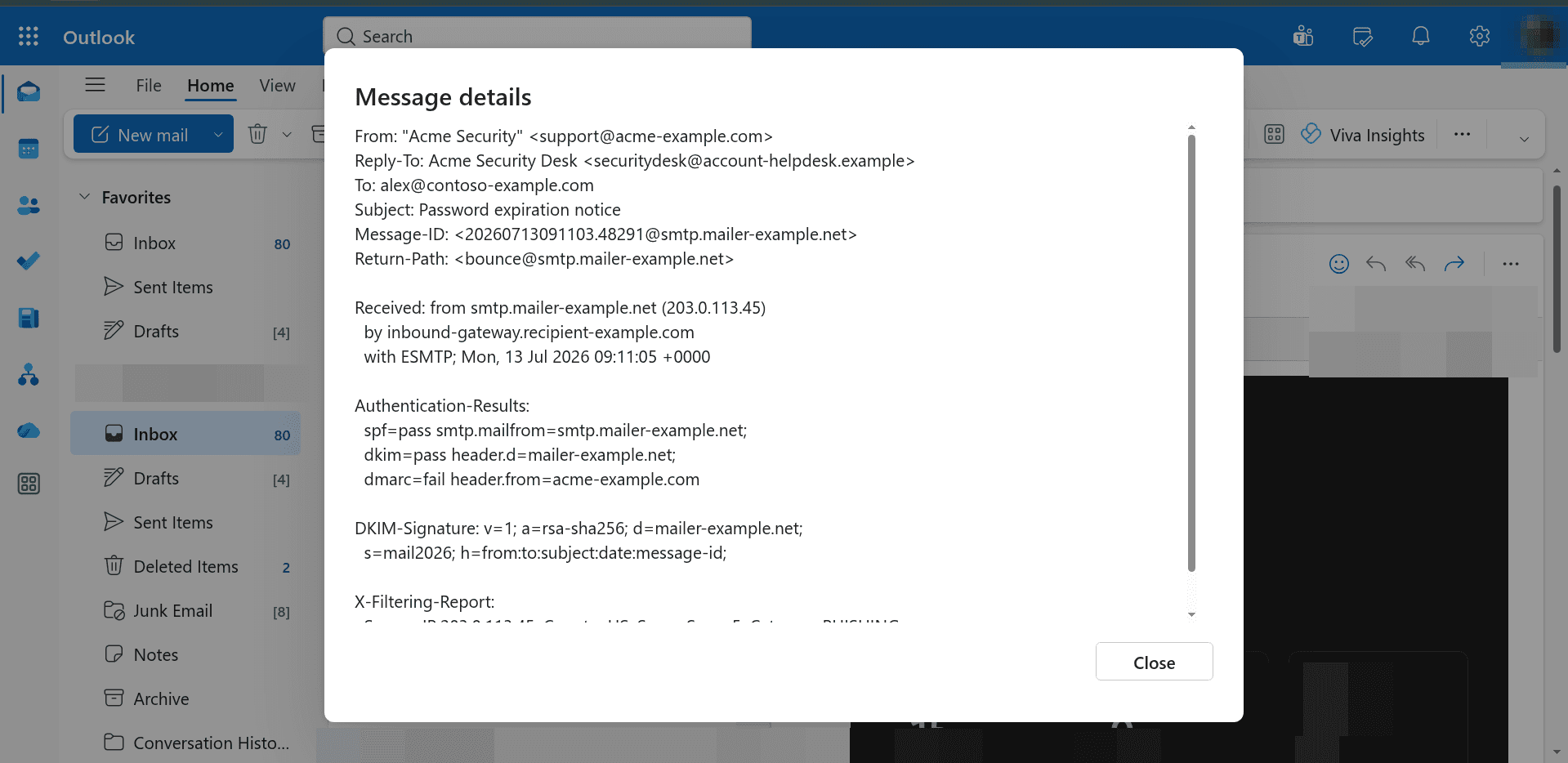
To view the email headers in Outlook, you can follow the steps bellow:
- Open the suspicious email in your inbox.
- Right click the email, and find otion "View".
- Then in "View" go to "View message details"
This is a common telltale sign that raises suspicion:
`"SPF and DKIM can pass while the visible sender identity still fails DMARC."
Compare the sender identities
Start with:
From
Reply-To
Return-Path
These values can legitimately differ. Marketing platforms, support systems, and mailing services often use separate domains for sending, replying, and handling delivery failures.
The mismatch becomes suspicious when it does not make sense for the claimed sender or request.
For example, a password warning from a known vendor that directs replies to an unrelated helpdesk domain is inconsistent. But a known newsletter using a recognized email delivery service may be normal.
Compare suspicious messages with previous legitimate messages from the same organization.
Read email authentication results by domain
Never look only that “SPF passed” or “DKIM passed.” look the domain that passed.
SPF
SPF checks whether the connecting server is authorized to send for the envelope domain:
spf=pass smtp.mailfrom=mailer-example.net
This result authenticates mailer-example.net. It does not authenticate the visible From address.
DKIM
DKIM verifies a cryptographic signature associated with a signing domain:
dkim=pass header.d=mailer-example.net
A valid signature shows that the signed content validated against a key published by that domain. It does not prove that the visible sender belongs to the same organization.
DMARC
DMARC checks whether the domain visible in the From field aligns with a domain authenticated by SPF or DKIM:
dmarc=fail header.from=acme-example.com
In this case, the authenticated SPF and DKIM domains do not align with acme-example.com.
Some mail platforms also include composite or proprietary authentication verdicts that combine authentication and other message signals. These are useful evidence, but they should not override contradictory identity or behavioral evidence.
Reconstruct the delivery path
Each server that handles a message normally adds a Received header at the top.
This means the newest hop appears first and the oldest appears last.
Usually, the path is read from the bottom upward (sometimes these headers are not in chronological order, so you may need to look for timestamps). From a trust perspective, start at the top, find the first server you control, and then work downward.
In the example:
Received: from smtp.mailer-example.net (203.0.113.45)
  by inbound-gateway.recipient-example.com
The receiving gateway recorded that the connection came from 203.0.113.45.
Useful things to question include:
- Does the IP belong to the sender's normal email provider?
- Does reverse DNS match the sending infrastructure?
- Is the country or region unexpected?
- Is a new relay or forwarding service present?
- Does the route match previous legitimate messages?
Headers added before the message reached the first trusted server may have been forged.
Practical investigation workflow
- Preserve the message: Collect the original message, recipient, subject,
timestamps,
Message-ID, and any platform-specific message identifier when available. - Compare identities: Review
From,Reply-To,Return-Path, and the domains used in links. - Establish the trusted boundary: Locate the first
ReceivedandAuthentication-Resultsheaders added by your mailbox provider or secure email gateway. - Evaluate authentication: Record SPF, DKIM, DMARC, and provider verdicts together with the exact domains evaluated.
- Trace the infrastructure: Extract the connecting IP, HELO name, PTR record, and route. Compare them with known-good messages.
- Check verdicts and overrides: Review filtering headers, message trace, security-console verdicts, transport rules, allow lists, and safe-sender settings.
- Correlate beyond the headers: Determine whether other recipients received the same message. Inspect links, attachments, sender behavior, sign-in activity, mailbox rules, OAuth grants, and conversation history.
Conclusion
Email headers are one of the best starting points in a phishing investigation, but they should be treated as evidence, not as the final answer. They can reveal which systems handled a message, which domains authenticated it, where replies will go, and whether filtering rules or overrides influenced delivery.
The real value comes from reading those signals together. A message may pass authentication and still be dangerous, or look suspicious because of a legitimate third-party sender. Strong investigations combine header evidence with sender identity, domain analysis, content review, infrastructure reputation, relationship history, and user or account behavior.