3 OAuth Abuse Techniques Attackers Use to Bypass Email Security
Look at how attackers abuse OAuth consent, device-code flows, redirects, and post-consent mailbox access to move around traditional email defenses.
OAuth was designed to make access easier and safer. Instead of giving every third-party application a password, users authorize an application to access specific resources through a trusted identity provider.
That model is useful for legitimate SaaS workflows. It is also attractive to attackers.
Modern OAuth abuse does not always look like classic credential phishing. In many cases, the victim is sent to a real Microsoft identity endpoint. The message may not contain malware. The link may point to a trusted login domain. The user may even complete MFA successfully.
The attacker’s objective is different, obtain consent, force a redirect, capture a token, or use a legitimate authorization flow as part of a larger phishing chain. OAuth-style abuse is not new;
That is why OAuth abuse can bypass email security. The malicious part is not always the first URL in the email. It is the relationship between the sender, the OAuth parameters, the application identity, the requested permissions, and what happens after the user clicks.
Why OAuth Abuse Is Difficult to Classify
A traditional phishing email asks for a password on a fake login page.
OAuth abuse changes the problem. The user may be asked to approve a real consent prompt, enter a code on a real Microsoft device-login page, or follow a real OAuth authorization URL that later redirects to attacker infrastructure.
From a security-control perspective, this creates ambiguity:
- The URL may begin with
login.microsoftonline.comor another trusted identity provider. - The sender may use a routine business lure such as document review, voicemail, Teams meeting, invoice, or password reset.
- The email may not contain an attachment or known malicious domain.
- The authentication event may be successful because the victim completed MFA.
- The post-compromise activity may happen through Microsoft Graph, Exchange Online, SharePoint, OneDrive, or another SaaS API.
OAuth abuse is therefore not only an email problem and not only an identity problem. It sits between both.
1. Consent Phishing: Turning the User Into the Authorization Step
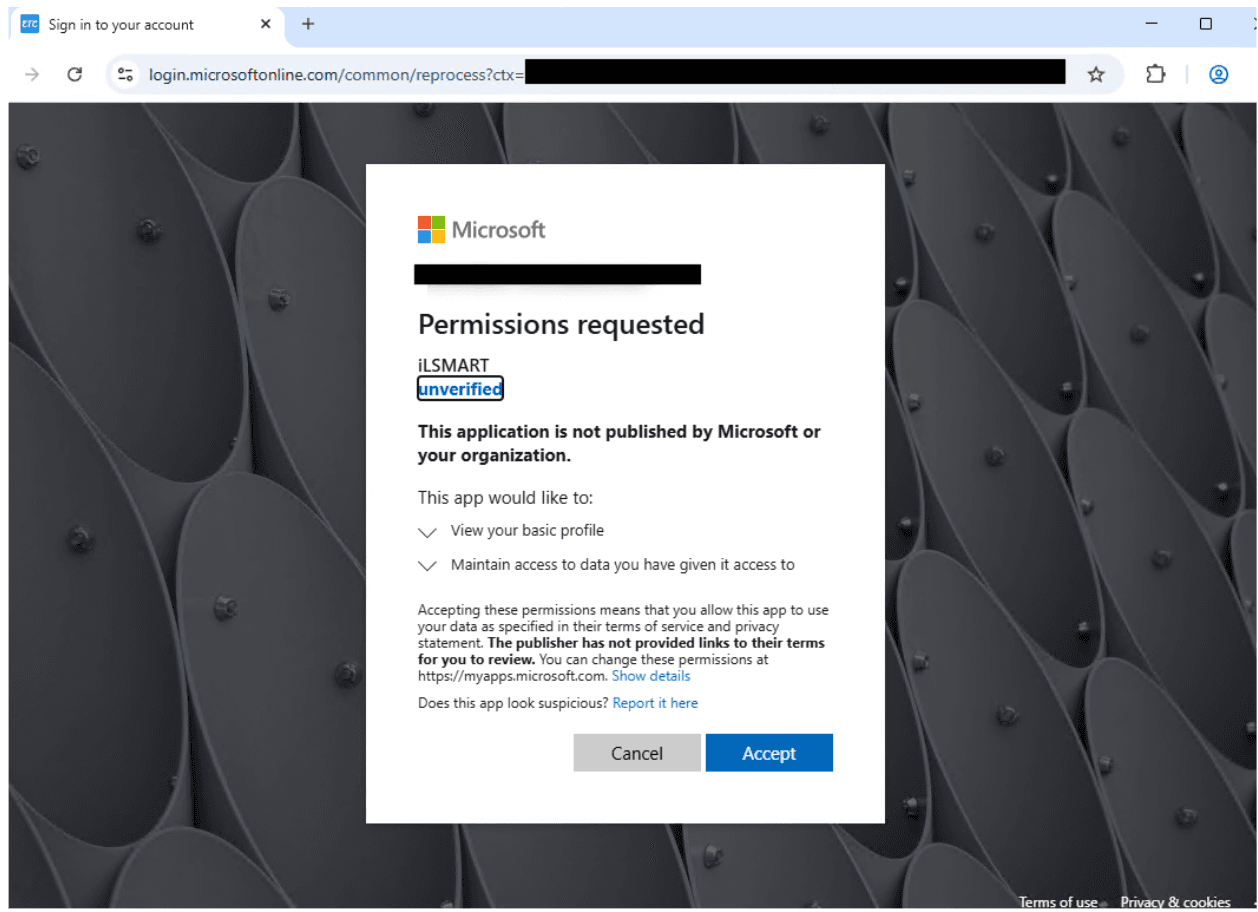
Consent phishing tricks a user into authorizing a malicious or attacker-controlled cloud application.
The attacker registers an application, gives it a convincing name, adds branding that resembles a real service, and sends a link to the OAuth consent flow. When the victim accepts, the application receives delegated permissions to access data as that user.
The attacker does not need the user’s password. They need the user to approve access.
A malicious consent request may ask for permissions such as:
Mail.Read
Mail.Send
Files.Read.All
MailboxSettings.ReadWrite
offline_access
Some permissions are obviously sensitive. Others look harmless until they are combined. offline_access, for example, can allow refresh-token based access when paired with other permissions. Mail.Read gives visibility into conversations, invoices, password resets, internal contacts, and future phishing opportunities.
Detection Signals
The most useful signals are not only in the email body. They appear across email, identity, and application audit logs.
Look for new or unusual application consent events, especially when they occur shortly after a suspicious email. Review the publisher verification status, requested permissions, client_id, redirect_uri, and whether the application has ever been used in the tenant before.
High-risk permission clusters deserve priority. Microsoft’s app consent grant investigation guidance highlights broad delegated permissions such as Mail.*, Contacts.*, MailboxSettings.*, People.*, Files.*, Notes.*, and Directory.AccessAsUser.All as commonly misused or high-impact areas in consent attacks.
2. Device Code Phishing: Real Login, Attacker-Controlled Session
Device code authentication is a legitimate OAuth flow for devices that cannot easily support interactive login, such as smart TVs, printers, or command-line tools. In abuse cases, device code phishing turns that flow into an account-takeover path.
In a phishing scenario, the attacker starts the device-code flow from their own infrastructure. The victim receives a lure that tells them to open a legitimate device-login page and enter a short code.
The key deception is subtle, the victim is not logging into the attacker’s site. They are approving the attacker’s pending session.
Recent device-code campaigns improved this technique with dynamic code generation. Instead of placing an expiring code directly in the email, the phishing landing page generates a fresh code only after the victim clicks. That removes the old 15-minute timing problem and makes the attack easier to run at scale.
Detection Signals
Monitor sign-ins that use the device-code flow, especially for users who do not normally authenticate that way.
Strong follow-on signals include new device registration, unusual Microsoft Graph activity, mailbox access from unfamiliar infrastructure, rapid inbox-rule creation, or access patterns that begin shortly after a user clicks an email link.
For many organizations, the cleanest control is to block or tightly restrict device-code flow unless there is a documented business requirement.
3. OAuth Redirect Abuse: Using Identity Providers as Trusted Redirectors
Not every OAuth abuse case is about stealing a token.
Microsoft reported phishing-led campaigns that abused OAuth redirection behavior by crafting authorization URLs with manipulated parameters. In observed examples, attackers used patterns such as prompt=none, invalid scopes, encoded state values, and attacker-controlled redirect destinations.
The purpose was to route victims through a trusted authorization endpoint before sending them to phishing or malware infrastructure.
A simplified defensive view of the pattern looks like this:
Email lure
  → trusted OAuth authorization endpoint
  → forced error or silent-authentication path
  → attacker-controlled redirect URI
  → phishing page, AiTM framework, or malware delivery
The state parameter is especially important. It is normally used to correlate OAuth requests and responses. In abuse cases, attackers have used it to carry encoded victim information, such as an email address, so the phishing page can be pre-filled or personalized.
Detection Signals
Hunt for OAuth authorization URLs in unsolicited emails, especially where the URL includes suspicious combinations such as:
prompt=none
scope=<invalid or unusual value>
state=<encoded email or opaque tracking value>
redirect_uri=<unknown or newly seen domain>
client_id=<not in known application inventory>
Detection should inspect the full URL chain, not just the first domain. A trusted first hop does not make the final destination safe.
The Detection Problem: OAuth Is Context, Not Just a URL
OAuth abuse defeats simple controls because every individual piece can look normal.
A Microsoft login URL is normal. A SaaS consent prompt is normal. A document-review email is normal. A user completing MFA is normal. A mailbox sending email is normal.
The risk appears when those signals are connected.
For example, an email from a sender with no prior relationship contains a Microsoft OAuth authorization URL. The URL includes a client ID that has never appeared in the tenant before. The user grants consent to an unverified app. Ten minutes later, that app reads mail and creates a mailbox rule.
No single event tells the whole story. Together, they form a clear attack chain.
Conclusion
OAuth abuse is not a single technique. It is a way of turning legitimate identity infrastructure into part of the attack chain.
The best defense is to stop treating OAuth links, consent prompts, device-code activity, and mailbox behavior as separate events. They need to be reviewed together.
A trusted login domain does not make an email safe. A successful MFA prompt does not prove the session belongs to the user. A valid mailbox does not prove the message is trustworthy.