QR Code Phishing: How a Simple Scan Becomes Account Takeover
QR code phishing, or quishing, hides malicious links inside QR codes to move victims from email to mobile credential theft. Learn how it works, why it bypasses traditional defenses, and what signals security teams should watch.
QR codes are built for convenience. They remove the need to type a long URL, make mobile access faster, and are now common in restaurants, parking meters, tickets, delivery notices, authentication flows, and business documents. That same convenience is what makes them useful to attackers.
QR code phishing, also called quishing, is a phishing technique where the malicious link is hidden inside a QR code instead of being written as a normal clickable URL. The victim scans the code, usually with a phone, and is sent to a fake login page, malware download, payment page, or adversary-controlled redirect chain.
In Q1 2026, Microsoft Threat Intelligence reported that QR code phishing increased from 7.6 million attacks in January to 18.7 million in March, a 146% increase over the quarter. Microsoft also described QR phishing as the fastest-growing email attack vector during that period.
What Is QR Code Phishing?
QR code phishing is a social engineering attack that uses a QR code to hide the destination of a malicious link.
In a normal phishing email, the victim may see a button like:
Review document
or a visible URL like:
https://example-login-page.com
In QR phishing, that destination is encoded inside an image.
The email may say:
Scan the QR code to review your secure document.
or:
Scan to complete Microsoft 365 verification.
The user does not see the real URL until after scanning it. By that point, the attack has moved from the protected email environment to a mobile browser, where URL inspection is harder and corporate security controls may be weaker.
How a QR Phishing Attack Works
A typical QR phishing attack follows a simple path.
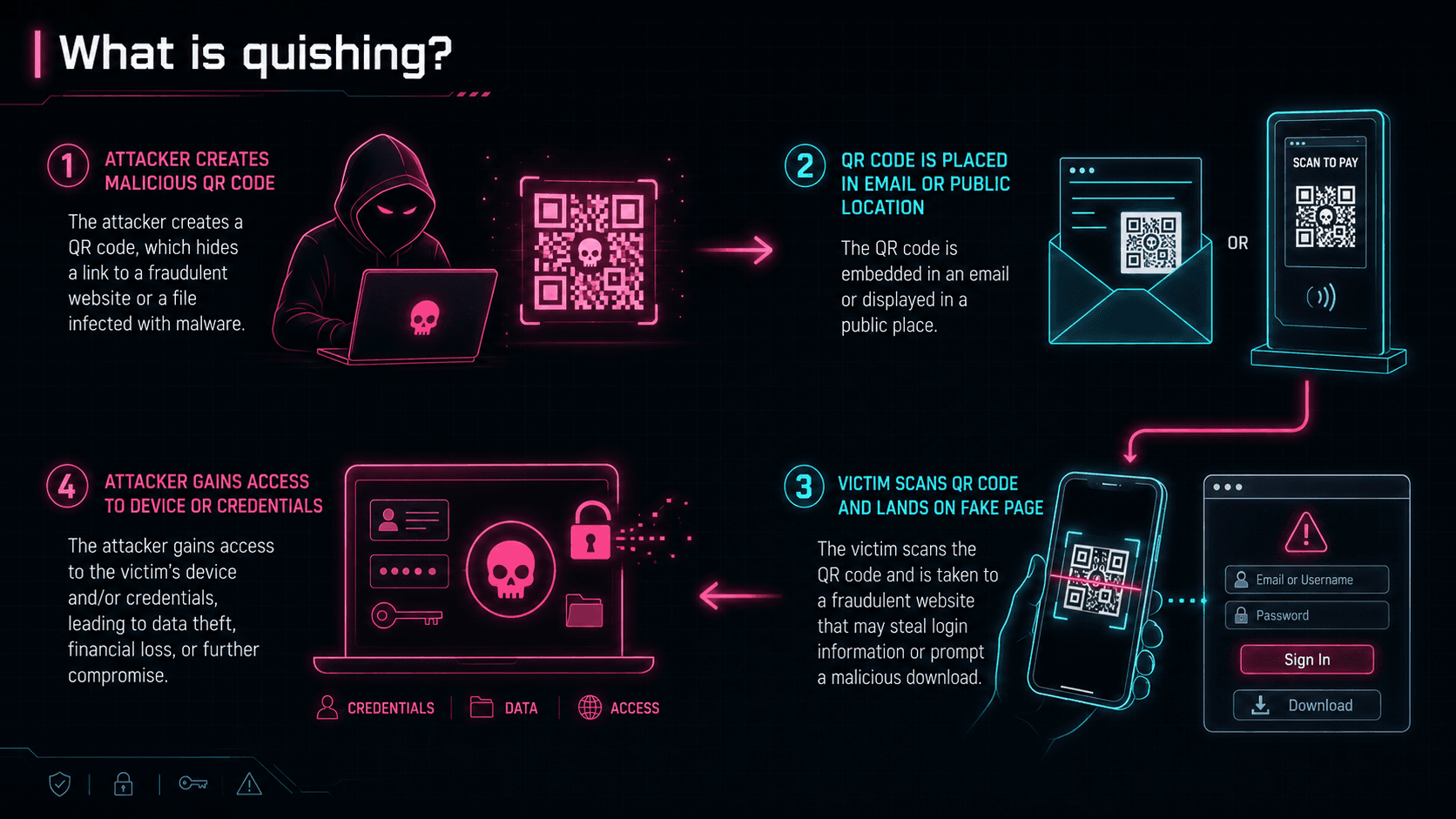
The attack usually starts with an email that looks routine. It may impersonate Microsoft, DocuSign, SharePoint, a voicemail system, an HR portal, a delivery provider, or an internal IT process.
The message often contains very little text. That is intentional. Less text means fewer natural language signals for security tools to analyze.
The QR code can appear directly in the email body, but it is often placed inside a PDF, Word document, image attachment, or fake secure document notice. According to Microsoft's Q1 2026 analysis, PDFs were the dominant delivery method for QR phishing, increasing from 65% of QR attacks in January to 70% in March. Microsoft also reported a late-quarter spike in QR codes embedded directly in email bodies, which surged 336% in March.
Once the victim scans the code, they are usually taken through one or more redirect steps. Some attacks use CAPTCHA pages to look legitimate or slow automated security analysis. Others fingerprint the device or browser before deciding whether to show the phishing page.
Eventually, the victim lands on the attackers infrastructure.
Common QR Phishing Lures
Most QR phishing emails are built around normal business actions.
Common lures include:
- Password expiration notices
- MFA enrollment or verification prompts
- Missed voicemail notifications
- Secure document review requests
- DocuSign or contract review messages
- SharePoint or OneDrive file access
- Delivery or package rescheduling
- Invoice, payment, or billing portal notices
Microsoft reports that credential theft is one of the most common objectives of QR code phishing campaigns, showing how attackers use this technique to gain account access.
A stolen account can give an attacker access to email, internal files, Teams conversations, vendor communication, password resets, and future phishing opportunities. The QR code is only the first step. The real objective is trusted access.
Why Attackers Use QR Codes
QR phishing works because it changes the shape of the attack.
Traditional email security tools are very good at inspecting visible links, known malicious domains, suspicious attachments, and obvious phishing language. QR codes reduce some of those signals.
A malicious URL is no longer text. It is part of an image.
That matters because some defenses still focus heavily on text-based scanning. QR phishing attempts exploit the limitations of text-based scanning engines by embedding malicious URLs inside image-based QR codes, either in the body of an email or inside an attachment.
The UK National Cyber Security Centre also highlights three reasons QR codes make sense from an attacker’s perspective: users are more cautious with suspicious links than QR codes, not all tools scan images, and users often scan QR codes with personal phones that may not have the same protections as corporate devices.
Conclusion
This technique works because it makes a malicious link feel like a normal action.
The user thinks they are completing a routine task. The attacker is moving them out of the inspected email environment and into a mobile phishing flow.
That is why QR phishing should be treated as more than a user-awareness problem. It requires email analysis, QR decoding, redirect inspection, mobile protection, identity monitoring, and fast account response.
When the link is hidden inside an image, the defense has to look beyond the message.